

A lot of AI music tools promise instant results, but many of them still leave people stuck between a rough sketch and something that actually feels usable. That is why AI Song Generator stands out. In my testing, it feels less like a novelty prompt box and more like a guided production layer: you can start with a plain-language idea, move into lyrics when needed, choose a model based on quality and cost, and then keep shaping the result with track-level tools instead of starting over from zero.
What makes that difference matter is not just speed. It is the shift in creative pressure. Instead of asking users to think like producers first, the platform lets them think like creators first. You describe a mood, a genre, a hook, or a lyrical theme, and the system handles much of the heavy lifting. For beginners, that lowers the barrier. For experienced users, it shortens the path from concept to draft. The result is not that music-making becomes effortless, but that the first version arrives much faster, and that changes the whole rhythm of the process.
How The Platform Actually Creates Music
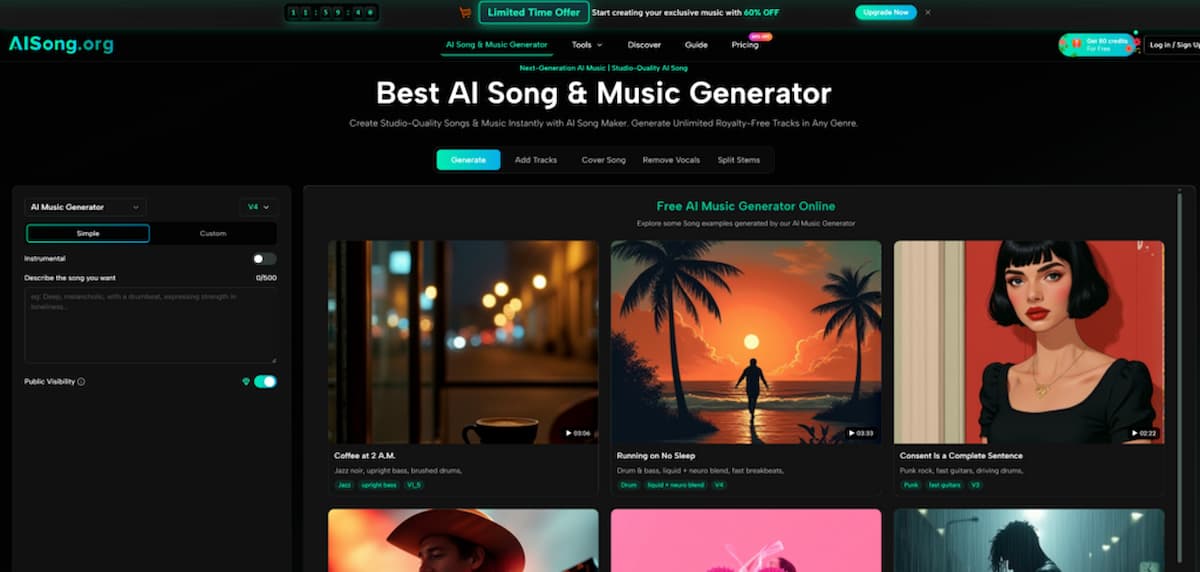
At its core, the platform is built around two generation paths: a lighter path for speed and a more controlled path for precision. That split is important, because it reveals how the product is designed to serve both casual users and people who want more direct authorship.
Simple Mode Favors Speed And Momentum
Simple Mode is the quick-entry route. You describe the song in plain language, such as mood, genre, tempo, or overall feeling, and the system builds the song around that input. In practical terms, this mode is useful when the real goal is exploration. You may not know the exact lyrical structure or instrumentation yet. You only know you want something cinematic, melancholic, bright, nostalgic, or upbeat.
In my view, this mode works best when you want to generate multiple directions quickly. It reduces friction and encourages experimentation, which is often more valuable than precision at the beginning of a project.
Custom Mode Gives More Creative Control
Custom Mode is where the product becomes more interesting. You can write your own lyrics, and the platform supports structured sections such as verses, choruses, and bridges. If you do not want to write everything manually, the built-in lyrics assistant can generate structured lyrics from themes or keywords.
That means the workflow is not limited to “type prompt, get song.” It can also become “shape the words first, then generate the performance and arrangement.” For people who care about message, hook placement, or emotional pacing, that extra control matters.
Why Structured Lyrics Change The Result
When lyrics are organized clearly, the generated song tends to feel more deliberate. A chorus can land like a chorus. A bridge can actually feel like a lift or tonal shift. That does not guarantee a perfect song every time, but it makes the output feel less random and more aligned with songwriting logic.
Model Choice Changes More Than Audio Quality
One thing I noticed is that the platform does not treat all generations as equal. It uses a model ladder, and that affects both song length and expected output quality.
Lower Models Work Better For Fast Drafting
The lower-cost models are better suited to sketches, experiments, and early-stage concepting. If you are trying to test five directions in one sitting, these are the sensible choice. They help you learn what kind of prompt language works before you spend more on premium output.
Higher Models Are Better For Serious Releases
The stronger models are positioned for higher-quality work, with longer maximum duration and more refined output. From the official guide, V4.5 is framed as the recommended balance point, while V5 and V5.5 are more premium options for users who want better quality, deeper stylistic alignment, or more distinctive results.
Where V4.5 Feels Most Practical
If I were choosing based on value rather than hype, V4.5 looks like the most realistic everyday option. It appears to be where quality, flexibility, and credit efficiency meet in a way that makes sense for frequent creators. V5 and V5.5 may be worth it for flagship tracks, but V4.5 seems like the model many users would actually live in.
Real Workflow From Prompt To Download
The AI Song Maker official flow is refreshingly straightforward, and that simplicity is part of the product’s appeal.
Step One Choose Mode And Input
Start by choosing Simple Mode or Custom Mode. In Simple Mode, describe the song idea in natural language. In Custom Mode, either paste your own lyrics or generate them from themes.
Step Two Select Model And Settings
Next, choose the model that fits your goal. You can also refine generation with options such as vocal gender and style behavior. For users who want tighter control, these settings help narrow the gap between idea and result.
Step Three Generate And Refine
After that, click generate and wait for the song to render. The official guide suggests a typical wait of around 30 to 60 seconds. If the result misses the mark, you can regenerate rather than rebuilding the whole setup.
Step Four Download Or Continue Editing
Once you have a version worth keeping, you can download it or move into additional tools such as extending the song, separating vocals, splitting stems, or adding tracks.
What Makes The Editing Layer More Useful
Many AI music products stop at first-pass generation. This one goes further, and that second layer is one of the main reasons it feels more practical.
Add Tracks Extends The Life Of A Draft
Add Tracks lets you build on an existing piece by adding vocals to an instrumental or instrumentals to a vocal idea. That matters because not every good song starts as a complete song. Sometimes the useful part is only the topline, the lyric concept, or the backing groove.
Why Audio Weight Matters Here
The platform includes an audio matching control for Add Tracks, which helps determine how closely the new material should align with the original. That sounds technical, but the real benefit is simple: the edit can feel more integrated rather than pasted on.
Stem Splitting Opens Up Remix Thinking
The ability to extract stems makes the platform more relevant for creators who want to go beyond casual use. If you can separate core elements, you can remix, rebalance, or bring the material into a traditional production workflow later. That is especially useful for people working in video, podcasting, content branding, or early-stage demo creation.
Where The Pricing Logic Makes Sense
The pricing structure suggests that the product is built for several kinds of users at once. There is a free entry point, there are credit-based plans, and there are higher-tier plans for heavier use.
| Comparison Point | What It Suggests In Practice |
| Free tier | Good for testing the workflow before committing |
| Credit system | Better for users who want flexible usage rather than fixed output |
| Multiple model levels | Lets users match quality to project importance |
| Add Tracks and stem tools | Pushes the platform beyond one-click generation |
| Commercial license language | Makes it more relevant for creator and business workflows |
From my perspective, the pricing structure is less about selling a single plan and more about guiding users into a production habit. Casual users can try the system without much risk. More serious creators can scale into better models and more advanced tools once they know the workflow suits them.
Who Will Get The Most From It
The product makes the most sense for people who need usable music quickly but do not necessarily want to spend their time inside a full production environment.
Content Creators Can Move Faster
Short-form video creators, YouTubers, and podcasters often need music that is original, fast to produce, and easy to adapt. For them, the combination of generation, extension, and vocal removal feels especially practical.
Songwriters Can Prototype Faster
For writers, the value is less about replacing composition and more about compressing the demo stage. You can test lyrical ideas, genre shifts, and arrangement concepts without building everything manually from scratch.
Teams Can Use It For Early Creative Direction
Agencies, app teams, and creative studios can use it to generate references, sonic directions, or demo-grade assets before deciding which ideas deserve deeper production investment.
Where The Limits Still Show
No serious review should pretend AI music is effortless or perfectly controllable. This platform is capable, but it still depends heavily on input quality and iteration.
Prompt Quality Still Shapes The Output
If the description is vague, the song can feel generic. The better the brief, the more coherent the result tends to be. That is not unique to this tool, but it is worth stating clearly.
Best Results Usually Come After Iteration
In my testing mindset, the strongest workflow is rarely the first render. The real advantage is how quickly the platform lets you try again with better phrasing, stronger lyrics, or a different model.
Why That Is Not A Weakness
This is not really a flaw in the traditional sense. It is closer to how creative work already happens. Draft, react, revise, repeat. The difference here is that those loops happen much faster than they would in a conventional studio process.
What The Product Signals About Music Creation
The most interesting thing about this platform is not just that it generates songs. It is that it treats song creation as an editable chain rather than a single moment. You can begin with an idea, turn it into a track, modify the structure, adjust the role of vocals, separate components, and keep pushing the draft toward a more finished state.
That makes the tool feel less like a gimmick and more like a working layer between inspiration and production. It will not replace skilled musicianship, taste, or revision. But it can meaningfully reduce the distance between “I have an idea” and “I have something I can actually use.” For a lot of creators, that is the difference that matters most.